
NES
Battle Pong
Play online for free: no sign-up, no install, right in your browser.
Emulator
- Frame rate
- 0 FPS
- Speed
- 0 %
- Uptime
- 0:00
- Controller
- Keyboard
Emulated console
- CPU
- Ricoh 2A03 (6502), 1.79 MHz
- Memory
- 2 KB RAM
- Video
- PPU, 256×240, 54 colors
- Video memory
- 2 KB VRAM
- Sound
- 5 channels: 2 pulse, triangle, noise, DPCM
- Cartridge
- Mapper 0 · NROM, 32 KB / 8 KB
- Emulator core
- FCEUmm (EmulatorJS)
About Battle Pong
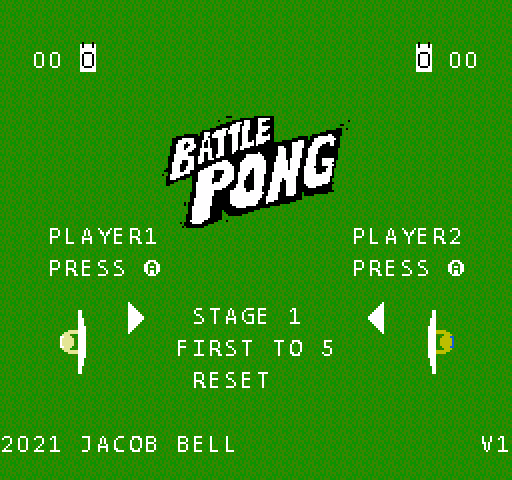
Jacob Bell's two-player Pong borrows ideas from fighting games: several balls in play, a super meter and a paddle you can charge up.
Moving forward and pressing A shoots an extra ball for two bars of meter, and moving back and pressing A places a deflector for one. Holding B makes the paddle run. The aim is to encourage mind games: pressure the other player, sit back and defend, or catch them out with a surprise shot.
Before a match, Start or Select changes the character colours and the menu keeps a running win count. The game is a free download on itch.io.
How to play
- Controls
- D-pad moves; forward plus A shoots a ball (2 meter); back plus A places a deflector (1 meter); hold B to run.
Facts
- A 2-player homebrew game, free on itch.io.
Cartridge
- Mapper
- 0 · NROM
- PRG / CHR
- 32 KB / 8 KB
- Mirroring
- Vertical
- Saves
- No
40,976 bytes · CRC32 2456FE29 · MD5 bc061b95cc6ce57cd2237f4bbf4f7a58
Keyboard controls
- D-pad
- ← ↑ ↓ →
- A
- Z
- B
- X
- Start
- Enter
- Select
- V
Steam Controller
- D-pad
- D-pad
- A
- A
- B
- B
- Start
- Start
- Select
- Select
Xbox controller
- D-pad
- D-pad
- A
- A
- B
- B
- Start
- Menu
- Select
- View
DualSense controller
- D-pad
- D-pad
- A
- ✕
- B
- ○
- Start
- Options
- Select
- Create
Keys and controller buttons can be remapped with the Controls button under the game. Save and Load keep a snapshot of the game in your browser. Steam Controller works as a gamepad through Steam Input. On phones, on-screen buttons appear.
More Sports games: NES
View all Ball BounceNES · Sports
 Tailgate PartyNES · Sports
 Spooky SoccerNES · Sports
 Pong de las TMNT IINES · Sports
 Pong de las TMNT IIINES · Sports
 NinjaSlapperNES · Sports
 PongNES · Sports
 Pong 1KNES · Sports
 Pong 1K2PNES · Sports
 Pong 2 Player 21NES · Sports
 Pong 198XNES · Sports
 Pong and Head BounceNES · Sports