
NES
Crypto
Play online for free: no sign-up, no install, right in your browser.
Emulator
- Frame rate
- 0 FPS
- Speed
- 0 %
- Uptime
- 0:00
- Controller
- Keyboard
Emulated console
- CPU
- Ricoh 2A03 (6502), 1.79 MHz
- Memory
- 2 KB RAM
- Video
- PPU, 256×240, 54 colors
- Video memory
- 2 KB VRAM
- Sound
- 5 channels: 2 pulse, triangle, noise, DPCM
- Cartridge
- Mapper 4 · MMC3 / TxROM, 32 KB / 16 KB
- Emulator core
- FCEUmm (EmulatorJS)
About Crypto
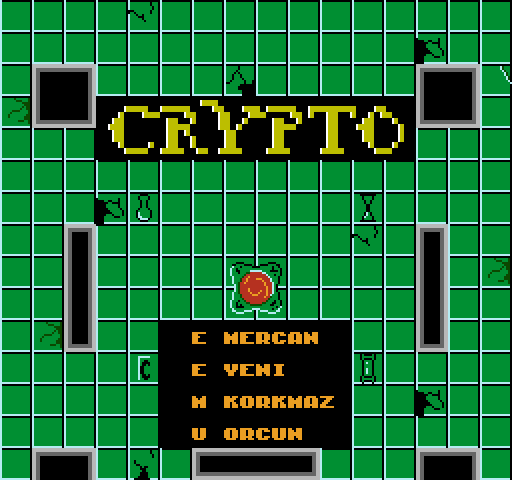
A two-player co-op dungeon game made in 48 hours for the Global Game Jam 2016: find four magic items scattered around the crypt and carry each to its place in the centre.
Whoever carries an item moves slowly and cannot fight, so one player usually carries while the other defends. Both can carry the same item to move it faster, but then nobody fights and you have to move in step. Silhouettes on the start screen show where each item belongs. After all four are placed the next room starts with stronger, faster enemies, and the game ends when either player dies.
shultays posted it on the NESdev forum on 31 January 2016, thanking the people on #nesdev who helped. The itch.io release credits Kabraxis, Mustafa Korkmaz, taytay and erdem.yeni and is in English and Turkish.
How to play
- Controls
- The D-pad moves, A attacks, hold B to carry an item.
Facts
- Made in 48 hours for the Global Game Jam 2016.
- Posted on the NESdev forum on 31 January 2016.
- Available in English and Turkish.
Cartridge
- Mapper
- 4 · MMC3 / TxROM
- PRG / CHR
- 32 KB / 16 KB
- Mirroring
- Four-screen
- Saves
- No
49,168 bytes · CRC32 F6334554 · MD5 17dbfe4e21dd4fce680c7d81033a34ba
Keyboard controls
- D-pad
- ← ↑ ↓ →
- A
- Z
- B
- X
- Start
- Enter
- Select
- V
Steam Controller
- D-pad
- D-pad
- A
- A
- B
- B
- Start
- Start
- Select
- Select
Xbox controller
- D-pad
- D-pad
- A
- A
- B
- B
- Start
- Menu
- Select
- View
DualSense controller
- D-pad
- D-pad
- A
- ✕
- B
- ○
- Start
- Options
- Select
- Create
Keys and controller buttons can be remapped with the Controls button under the game. Save and Load keep a snapshot of the game in your browser. Steam Controller works as a gamepad through Steam Input. On phones, on-screen buttons appear.
More Action games: NES
View all StreemerzNES · Action
 CatsNES · Action
 Cat KillerNES · Action
 The MasmixNES · Action
 Rookie Egg JugglersNES · Action
 The Chrilogy Loop: For PointsNES · Action
 Candelabra Tiny Tales: The Absconder of Dungeon WarrenNES · Action
 8-Bit Slasher 4-in-1 Horror DemakesNES · Action
 Zooming SecretaryNES · Action
 Vigilante Ninja 2NES · Action
 The Paper PlaneNES · Action
 The One with the WallsNES · Action