NES
Happy
Play online for free: no sign-up, no install, right in your browser.
Emulator
- Frame rate
- 0 FPS
- Speed
- 0 %
- Uptime
- 0:00
- Controller
- Keyboard
Emulated console
- CPU
- Ricoh 2A03 (6502), 1.79 MHz
- Memory
- 2 KB RAM
- Video
- PPU, 256×240, 54 colors
- Video memory
- 2 KB VRAM
- Sound
- 5 channels: 2 pulse, triangle, noise, DPCM
- Cartridge
- Mapper 0 · NROM, 32 KB / 8 KB
- Emulator core
- FCEUmm (EmulatorJS)
About Happy
- Platform
- NES
- Developer
- Wendel Scardua
- Year
- 2020
- Genre
- Board and card
- Players
- 1-4
- License
- Homebrew
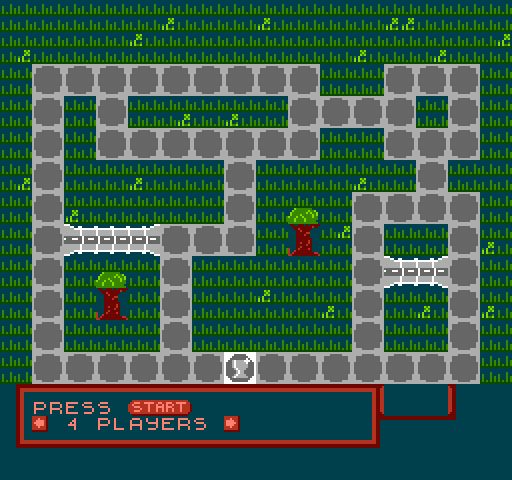
Wendel Scardua's dice board game HappyNESs, made for the #1JAM Party jam in March 2020.
Pawns travel a looping stone path, rolling a die each turn and collecting suits by passing over suit squares. If you land on a square someone already holds, you move on further and they get an extra roll next turn. Crossing a bridge blocks it for a while. To win you need all eight suit squares, four green and four blue, and then the trophy square.
A browser version followed soon after release, and the source code is on GitHub.
How to play
- Controls
- Pick the number of players with the arrows and press Start. On your turn press A to roll.
Facts
- Made for the 1JAM Party jam and released in March 2020.
- A devlog added bridges that become temporarily blocked when crossed.
- Source code on GitHub as happy.nes.
Cartridge
- Mapper
- 0 · NROM
- PRG / CHR
- 32 KB / 8 KB
- Mirroring
- Vertical
- Saves
- No
40,976 bytes · CRC32 2A9F6C54 · MD5 33c753e0b2c8bd54bbb9ac6e7c5a54fd
Keyboard controls
- D-pad
- ← ↑ ↓ →
- A
- Z
- B
- X
- Start
- Enter
- Select
- V
Steam Controller
- D-pad
- D-pad
- A
- A
- B
- B
- Start
- Start
- Select
- Select
Xbox controller
- D-pad
- D-pad
- A
- A
- B
- B
- Start
- Menu
- Select
- View
DualSense controller
- D-pad
- D-pad
- A
- ✕
- B
- ○
- Start
- Options
- Select
- Create
Keys and controller buttons can be remapped with the Controls button under the game. Save and Load keep a snapshot of the game in your browser. Steam Controller works as a gamepad through Steam Input. On phones, on-screen buttons appear.