
NES
Turquoise Palace
Play online for free: no sign-up, no install, right in your browser.
Emulator
- Frame rate
- 0 FPS
- Speed
- 0 %
- Uptime
- 0:00
- Controller
- Keyboard
Emulated console
- CPU
- Ricoh 2A03 (6502), 1.79 MHz
- Memory
- 2 KB RAM
- Video
- PPU, 256×240, 54 colors
- Video memory
- 2 KB VRAM
- Sound
- 5 channels: 2 pulse, triangle, noise, DPCM
- Cartridge
- Mapper 0 · NROM, 32 KB / 8 KB
- Emulator core
- FCEUmm (EmulatorJS)
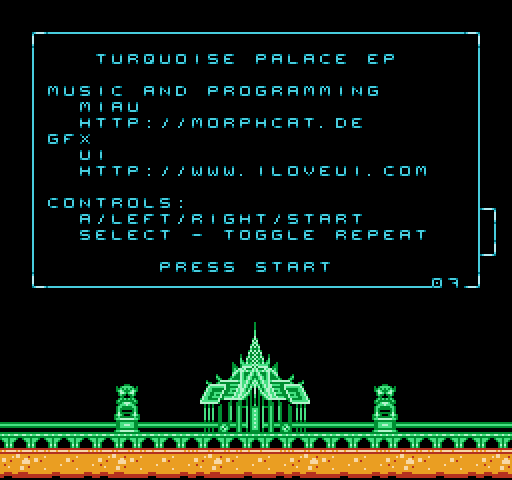
About Turquoise Palace
Miau's chiptune EP from 2008, released as an NES ROM with nine tracks.
The player screen shows the track, the time and the sound channels in front of a glowing palace.
Facts
- Miau released it in July 2008 under the MorphCat name as an NES musicdisk for the demoscene. Miau made the music and graphics, and UI the interface graphics.
- The release also offered the music as an NSF file and as a recording from real hardware.
Cartridge
- Mapper
- 0 · NROM
- PRG / CHR
- 32 KB / 8 KB
- Mirroring
- Vertical
- Saves
- No
40,976 bytes · CRC32 DADB8A8F · MD5 73a1c4bf37c6a0ce0b771baebd8ed2c1
Keyboard controls
- D-pad
- ← ↑ ↓ →
- A
- Z
- B
- X
- Start
- Enter
- Select
- V
Steam Controller
- D-pad
- D-pad
- A
- A
- B
- B
- Start
- Start
- Select
- Select
Xbox controller
- D-pad
- D-pad
- A
- A
- B
- B
- Start
- Menu
- Select
- View
DualSense controller
- D-pad
- D-pad
- A
- ✕
- B
- ○
- Start
- Options
- Select
- Create
Keys and controller buttons can be remapped with the Controls button under the game. Save and Load keep a snapshot of the game in your browser. Steam Controller works as a gamepad through Steam Input. On phones, on-screen buttons appear.
More Rhythm games: NES
View all StreemerzNES · Action
 Famidash: Huge ManNES · Platformer
 CatsNES · Action
 Cat KillerNES · Action
 The MasmixNES · Action
 Super Homebrew WarNES · Fighting
 Rookie Egg JugglersNES · Action
 Famidash: B-SidesNES · Platformer
 CelesteNES · Platformer
 After World DeluxeNES · Adventure
 Zombie Hunter BobNES · Fighting
 The Chrilogy Loop: For PointsNES · Action