
NES
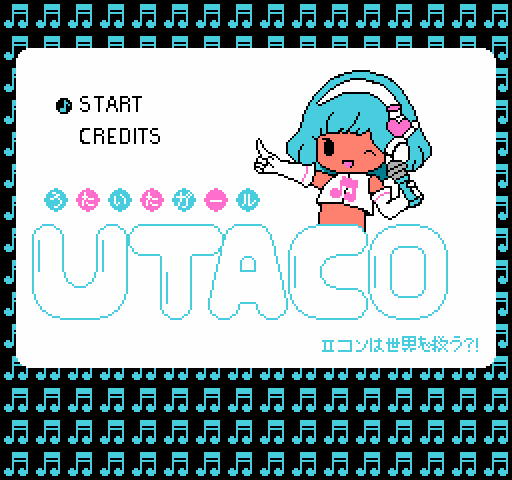
Utaco
Play online for free: no sign-up, no install, right in your browser.
Emulator
- Frame rate
- 0 FPS
- Speed
- 0 %
- Uptime
- 0:00
- Controller
- Keyboard
Emulated console
- CPU
- Ricoh 2A03 (6502), 1.79 MHz
- Memory
- 2 KB RAM
- Video
- PPU, 256×240, 54 colors
- Video memory
- 2 KB VRAM
- Sound
- 5 channels: 2 pulse, triangle, noise, DPCM
- Cartridge
- Mapper 4 · MMC3/TxROM, 128 KB / 32 KB
- Emulator core
- FCEUmm (EmulatorJS)
About Utaco
- Platform
- NES
- Developer
- Miguel Ángel Pérez Martínez (zurashu)
- Year
- 2013
- Genre
- Action
- Players
- 1
- License
- Homebrew
A short game played by singing into the microphone on the Famicom's second controller.
The heroine runs across a ruined city while lines of Japanese lyrics scroll past, and you sing each one as it comes up. The microphone only hears sound or silence, so timing matters more than singing well. On an NES without a microphone, a button works instead.
Miguel Ángel Pérez Martínez (zurashu) made it for A Game By Its Cover, a contest where entrants built in a month the game shown on a fake cartridge cover. He picked a cover by Fujino Tomoko because a game played with the rarely used Famicom microphone seemed fun. Forum users reported that Select glitches the lyrics section and that some clone consoles act as if B is always pressed.
Facts
- Made for the A Game By Its Cover contest, based on a fake Famicom cover by Fujino Tomoko.
- Designed for the Famicom microphone; playable on an NES with the controller.
- Credited to Miguel Angel, zurashu and surasshu.
Cartridge
- Mapper
- 4 · MMC3/TxROM
- PRG / CHR
- 128 KB / 32 KB
- Mirroring
- Horizontal
- Saves
- No
163,856 bytes · CRC32 558F7A7C · MD5 9f25195990f471a34ca37b0fdfb426ac
Keyboard controls
- D-pad
- ← ↑ ↓ →
- A
- Z
- B
- X
- Start
- Enter
- Select
- V
Steam Controller
- D-pad
- D-pad
- A
- A
- B
- B
- Start
- Start
- Select
- Select
Xbox controller
- D-pad
- D-pad
- A
- A
- B
- B
- Start
- Menu
- Select
- View
DualSense controller
- D-pad
- D-pad
- A
- ✕
- B
- ○
- Start
- Options
- Select
- Create
Keys and controller buttons can be remapped with the Controls button under the game. Save and Load keep a snapshot of the game in your browser. Steam Controller works as a gamepad through Steam Input. On phones, on-screen buttons appear.
More Action games: NES
View all StreemerzNES · Action
 CatsNES · Action
 Cat KillerNES · Action
 The MasmixNES · Action
 Rookie Egg JugglersNES · Action
 The Chrilogy Loop: For PointsNES · Action
 Candelabra Tiny Tales: The Absconder of Dungeon WarrenNES · Action
 8-Bit Slasher 4-in-1 Horror DemakesNES · Action
 Zooming SecretaryNES · Action
 Vigilante Ninja 2NES · Action
 The Paper PlaneNES · Action
 The One with the WallsNES · Action