NES
Blurred Lines 2048
Play online for free: no sign-up, no install, right in your browser.
Emulator
- Frame rate
- 0 FPS
- Speed
- 0 %
- Uptime
- 0:00
- Controller
- Keyboard
Emulated console
- CPU
- Ricoh 2A03 (6502), 1.79 MHz
- Memory
- 2 KB RAM
- Video
- PPU, 256×240, 54 colors
- Video memory
- 2 KB VRAM
- Sound
- 5 channels: 2 pulse, triangle, noise, DPCM
- Cartridge
- Mapper 4 · MMC3 / TxROM, 128 KB / 256 KB
- Emulator core
- FCEUmm (EmulatorJS)
About Blurred Lines 2048
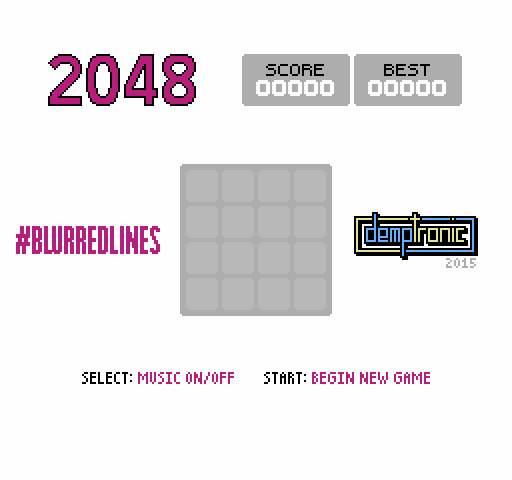
Demptronic's first NES game: 2048 on a 4 by 4 grid set to the song Blurred Lines, with small figures from the music video dancing beside the board.
How to play
- Controls
- Select switches the music on and off, Start begins a new game.
Facts
- Announced on the NESdev forum as Demptronic's first NES homebrew.
- The author called it a novelty and practice project that could not be sold because of the song's copyright.
Cartridge
- Mapper
- 4 · MMC3 / TxROM
- PRG / CHR
- 128 KB / 256 KB
- Mirroring
- Vertical
- Saves
- Yes
393,232 bytes · CRC32 BC571CA7 · MD5 e30eb0a4e55948799467f04411215e98
Keyboard controls
- D-pad
- ← ↑ ↓ →
- A
- Z
- B
- X
- Start
- Enter
- Select
- V
Steam Controller
- D-pad
- D-pad
- A
- A
- B
- B
- Start
- Start
- Select
- Select
Xbox controller
- D-pad
- D-pad
- A
- A
- B
- B
- Start
- Menu
- Select
- View
DualSense controller
- D-pad
- D-pad
- A
- ✕
- B
- ○
- Start
- Options
- Select
- Create
Keys and controller buttons can be remapped with the Controls button under the game. Save and Load keep a snapshot of the game in your browser. Steam Controller works as a gamepad through Steam Input. On phones, on-screen buttons appear.