
NES
Brick Breaker
Play online for free: no sign-up, no install, right in your browser.
Emulator
- Frame rate
- 0 FPS
- Speed
- 0 %
- Uptime
- 0:00
- Controller
- Keyboard
Emulated console
- CPU
- Ricoh 2A03 (6502), 1.79 MHz
- Memory
- 2 KB RAM
- Video
- PPU, 256×240, 54 colors
- Video memory
- 2 KB VRAM
- Sound
- 5 channels: 2 pulse, triangle, noise, DPCM
- Cartridge
- Mapper 0 · NROM, 16 KB / 8 KB
- Emulator core
- FCEUmm (EmulatorJS)
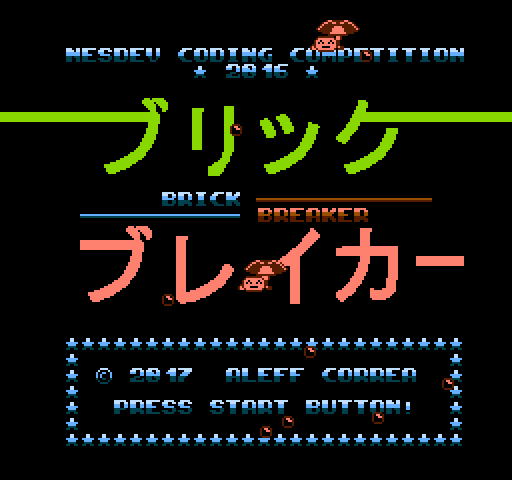
About Brick Breaker
A brick breaker by Aleff Correa where you aim each ball by hand before firing it from a small lifeform at the bottom of the screen.
Each of the stages has its own brick layout, a timer and a limited number of balls, and some bricks need several hits. If time runs out while you still have more than one ball, play continues; lose every ball and you can spend a credit to restart the level.
Correa (Punch on the NESdev forum) started it as Brix Battle in May 2016 and entered it in the 2016 NESdev Competition as Mini Brix Battle on 31 January 2017. It was then rebuilt as a 16 KB program for the Action 53 multicart, and the source was released under the MIT license in February 2017. A 2018 update removed the second level, Teeth.
How to play
- Goal
- Break every brick on the stage before the timer runs out.
- Controls
- Hold A to aim, steer with the D-pad and let go to fire. B moves faster.
Facts
- Started as Brix Battle on 28 May 2016.
- Entered in the 2016 NESdev Competition as Mini Brix Battle on 31 January 2017.
- Source released under the MIT license in February 2017.
- Included on Action 53 Volume 3.
Cartridge
- Mapper
- 0 · NROM
- PRG / CHR
- 16 KB / 8 KB
- Mirroring
- Horizontal
- Saves
- No
24,592 bytes · CRC32 AEDA2962 · MD5 fdd216846ac91880abcdc6fe9f8a2271
Keyboard controls
- D-pad
- ← ↑ ↓ →
- A
- Z
- B
- X
- Start
- Enter
- Select
- V
Steam Controller
- D-pad
- D-pad
- A
- A
- B
- B
- Start
- Start
- Select
- Select
Xbox controller
- D-pad
- D-pad
- A
- A
- B
- B
- Start
- Menu
- Select
- View
DualSense controller
- D-pad
- D-pad
- A
- ✕
- B
- ○
- Start
- Options
- Select
- Create
Keys and controller buttons can be remapped with the Controls button under the game. Save and Load keep a snapshot of the game in your browser. Steam Controller works as a gamepad through Steam Input. On phones, on-screen buttons appear.
More Action games: NES
View all StreemerzNES · Action
 CatsNES · Action
 Cat KillerNES · Action
 The MasmixNES · Action
 Rookie Egg JugglersNES · Action
 The Chrilogy Loop: For PointsNES · Action
 Candelabra Tiny Tales: The Absconder of Dungeon WarrenNES · Action
 8-Bit Slasher 4-in-1 Horror DemakesNES · Action
 Zooming SecretaryNES · Action
 Vigilante Ninja 2NES · Action
 The One with the WallsNES · Action
 The Paper PlaneNES · Action