
NES
Catventure: The Rad Cat Quest
Play online for free: no sign-up, no install, right in your browser.
Emulator
- Frame rate
- 0 FPS
- Speed
- 0 %
- Uptime
- 0:00
- Controller
- Keyboard
Emulated console
- CPU
- Ricoh 2A03 (6502), 1.79 MHz
- Memory
- 2 KB RAM
- Video
- PPU, 256×240, 54 colors
- Video memory
- 2 KB VRAM
- Sound
- 5 channels: 2 pulse, triangle, noise, DPCM
- Cartridge
- Mapper 30 · UNROM 512, 512 KB / RAM
- Emulator core
- FCEUmm (EmulatorJS)
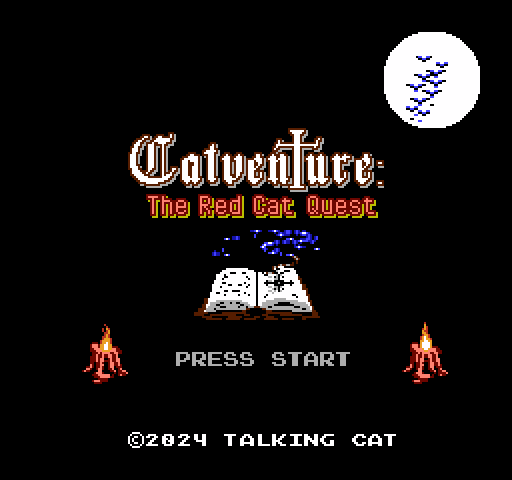
About Catventure: The Rad Cat Quest
- Platform
- NES
- Developer
- Talking Cat (Alexander Dergunov)
- Year
- 2024
- Genre
- Platformer
- Players
- 1
- License
- Homebrew
Ginger, a red cat, sets out to rescue her friend Flake from an evil necromancer in Talking Cat's NESmaker platformer Catventure: The Red Cat Quest.
Ginger fights with magic bubbles and boomerangs, and collecting ten ancient scrolls earns an extra life. The full game has five levels across thirteen locations, six boss fights and a secret horizontally scrolling level after the final boss.
It is the author's first full game, made as a hobby project in NESmaker, with music by Ryuukenger. There are English and Russian versions; the Russian title is Kotklyuchenie. The cartridge was released only in Russia, since sanctions prevent selling it abroad, so the ROMs and a manual are a free download on itch.io and a paid digital version is offered on boosty.to.
Facts
- Released on 15 July 2024.
- Made with NESmaker; music by Ryuukenger.
- Available in English and Russian; the Russian title is Kotklyuchenie.
- The cartridge was sold only in Russia.
Cartridge
- Mapper
- 30 · UNROM 512
- PRG / CHR
- 512 KB / RAM
- Mirroring
- Vertical
- Saves
- Yes
524,304 bytes · CRC32 C0B33BF0 · MD5 476d295cf6c0a4bbb645dc7cb943d549
Keyboard controls
- D-pad
- ← ↑ ↓ →
- A
- Z
- B
- X
- Start
- Enter
- Select
- V
Steam Controller
- D-pad
- D-pad
- A
- A
- B
- B
- Start
- Start
- Select
- Select
Xbox controller
- D-pad
- D-pad
- A
- A
- B
- B
- Start
- Menu
- Select
- View
DualSense controller
- D-pad
- D-pad
- A
- ✕
- B
- ○
- Start
- Options
- Select
- Create
Keys and controller buttons can be remapped with the Controls button under the game. Save and Load keep a snapshot of the game in your browser. Steam Controller works as a gamepad through Steam Input. On phones, on-screen buttons appear.
More Platformer games: NES
View all Famidash: Huge ManNES · Platformer
 Famidash: B-SidesNES · Platformer
 CelesteNES · Platformer
 Cheril the GoddessNES · Platformer
 Wo Xiang Niao NiaoNES · Platformer
 Vigilante Ninja 2NES · Action
 SatsmashNES · Platformer
 Proto DereNES · Platformer
 ROB.NNES · Platformer
 Cheril the WriterNES · Platformer
 5-StarNES · Platformer
 BooteeNES · Platformer