
NES
Forehead Block Guy
Play online for free: no sign-up, no install, right in your browser.
Emulator
- Frame rate
- 0 FPS
- Speed
- 0 %
- Uptime
- 0:00
- Controller
- Keyboard
Emulated console
- CPU
- Ricoh 2A03 (6502), 1.79 MHz
- Memory
- 2 KB RAM
- Video
- PPU, 256×240, 54 colors
- Video memory
- 2 KB VRAM
- Sound
- 5 channels: 2 pulse, triangle, noise, DPCM
- Cartridge
- Mapper 0 · NROM, 16 KB / 8 KB
- Emulator core
- FCEUmm (EmulatorJS)
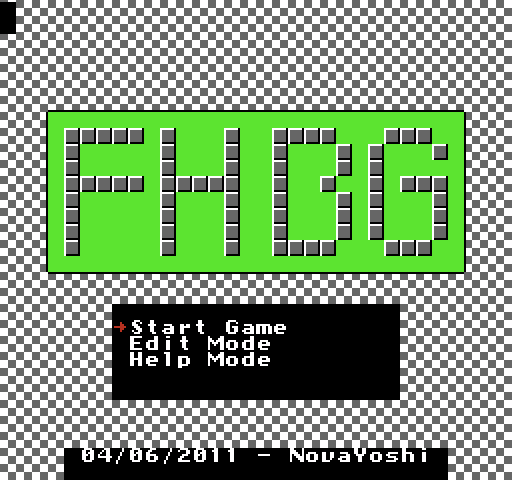
About Forehead Block Guy
- Platform
- NES
- Developer
- NovaYoshi
- Year
- 2011
- Genre
- Platformer
- Players
- 1
- License
- Homebrew
NovaYoshi's one-screen platformer: throw blocks from your forehead to stun enemies, then touch them to finish them off.
The author describes it as a bit like Mario Bros., except that you attack by hitting enemies with a block. You can also latch onto a block from the side and kick off it. Clear every enemy on the stage to move on. You start with five lives, and there is a built-in level editor.
It began as a planned port of the Atari 2600 game Fast Eddie and grew into its own game. It was NovaYoshi's (later NovaSquirrel's) entry in the 2011 NESdev competition, is included on the first Action 53 multicart and has a sequel, Double Action Blaster Guys.
How to play
- Controls
- B throws a block. In Edit Mode, Start tests the level and Select plus Start returns to the editor.
Facts
- Started as a port of the Atari 2600 game Fast Eddie.
- NovaSquirrel's entry in the 2011 NESdev competition; its sequel is Double Action Blaster Guys.
- Included on Action 53 Volume 1.
Cartridge
- Mapper
- 0 · NROM
- PRG / CHR
- 16 KB / 8 KB
- Mirroring
- Horizontal
- Saves
- No
24,592 bytes · CRC32 A84D71F2 · MD5 398a753ca54e82417b7ab2ee9beb8de3
Keyboard controls
- D-pad
- ← ↑ ↓ →
- A
- Z
- B
- X
- Start
- Enter
- Select
- V
Steam Controller
- D-pad
- D-pad
- A
- A
- B
- B
- Start
- Start
- Select
- Select
Xbox controller
- D-pad
- D-pad
- A
- A
- B
- B
- Start
- Menu
- Select
- View
DualSense controller
- D-pad
- D-pad
- A
- ✕
- B
- ○
- Start
- Options
- Select
- Create
Keys and controller buttons can be remapped with the Controls button under the game. Save and Load keep a snapshot of the game in your browser. Steam Controller works as a gamepad through Steam Input. On phones, on-screen buttons appear.
More Platformer games: NES
View all Famidash: Huge ManNES · Platformer
 Famidash: B-SidesNES · Platformer
 CelesteNES · Platformer
 Cheril the GoddessNES · Platformer
 Wo Xiang Niao NiaoNES · Platformer
 Vigilante Ninja 2NES · Action
 SatsmashNES · Platformer
 Proto DereNES · Platformer
 ROB.NNES · Platformer
 Cheril the WriterNES · Platformer
 5-StarNES · Platformer
 BooteeNES · Platformer