NES
From Below
Play online for free: no sign-up, no install, right in your browser.
Emulator
- Frame rate
- 0 FPS
- Speed
- 0 %
- Uptime
- 0:00
- Controller
- Keyboard
Emulated console
- CPU
- Ricoh 2A03 (6502), 1.79 MHz
- Memory
- 2 KB RAM
- Video
- PPU, 256×240, 54 colors
- Video memory
- 2 KB VRAM
- Sound
- 5 channels: 2 pulse, triangle, noise, DPCM
- Cartridge
- Mapper 0 · NROM, 32 KB / 8 KB
- Emulator core
- FCEUmm (EmulatorJS)
About From Below
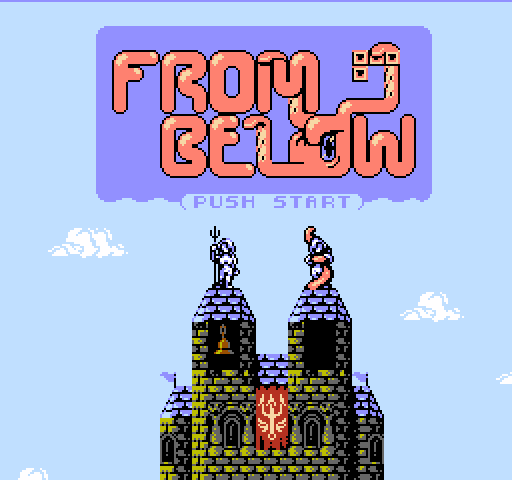
Matt Hughson's falling-block puzzle is set in a seaside castle under attack by a kraken.
With the archers out of arrows, the townsfolk throw the city's own stones at the monster to hold it off until help comes at dawn. In Timed mode its tentacles push blocks and debris up into the well every few seconds; in Fixed mode they strike every time you drop a piece, for slower play. The rules borrow modern features such as hard drops, wall kicks, T-spins and lock delay, and a later Classic mode removes the kraken.
Hughson announced the game in May 2020 and released version 1.0.0 in September 2020, with music and sound by Tui and art by Haller Zoltan. In December 2020 he began a version for the Nintendo VS. System arcade hardware, reworked to behave like a game designed for it rather than a quick port; Indie Retro News called it the first game release for the VS. System in 30 years, and beta 0.10.0 in January 2021 was expected to be the last before completion.
The NES cartridge sold out and was reissued in limited runs, the last ending on 16 October 2023. A Game Boy version, From Below Pocket, followed in 2023.
Facts
- Version 1.0.0 released in September 2020.
- A VS. System arcade version followed, with beta 0.10.0 in January 2021.
- Indie Retro News called it the first game release for the Nintendo VS. System in 30 years.
- From Below Pocket for Game Boy came out in 2023.
Cartridge
- Mapper
- 0 · NROM
- PRG / CHR
- 32 KB / 8 KB
- Mirroring
- Horizontal
- Saves
- No
40,976 bytes · CRC32 7239BF47 · MD5 15945fe933188072397cdfb0ad0cdfdb
Keyboard controls
- D-pad
- ← ↑ ↓ →
- A
- Z
- B
- X
- Start
- Enter
- Select
- V
Steam Controller
- D-pad
- D-pad
- A
- A
- B
- B
- Start
- Start
- Select
- Select
Xbox controller
- D-pad
- D-pad
- A
- A
- B
- B
- Start
- Menu
- Select
- View
DualSense controller
- D-pad
- D-pad
- A
- ✕
- B
- ○
- Start
- Options
- Select
- Create
Keys and controller buttons can be remapped with the Controls button under the game. Save and Load keep a snapshot of the game in your browser. Steam Controller works as a gamepad through Steam Input. On phones, on-screen buttons appear.