
NES
Inversion
Play online for free: no sign-up, no install, right in your browser.
Emulator
- Frame rate
- 0 FPS
- Speed
- 0 %
- Uptime
- 0:00
- Controller
- Keyboard
Emulated console
- CPU
- Ricoh 2A03 (6502), 1.79 MHz
- Memory
- 2 KB RAM
- Video
- PPU, 256×240, 54 colors
- Video memory
- 2 KB VRAM
- Sound
- 5 channels: 2 pulse, triangle, noise, DPCM
- Cartridge
- Mapper 0 · NROM, 32 KB / 8 KB
- Emulator core
- FCEUmm (EmulatorJS)
About Inversion
- Platform
- NES
- Developer
- Lucas "Dizzy9" Kur (Red Moon Games)
- Year
- 2013
- Genre
- Platformer, Puzzle
- Players
- 1
- License
- Homebrew
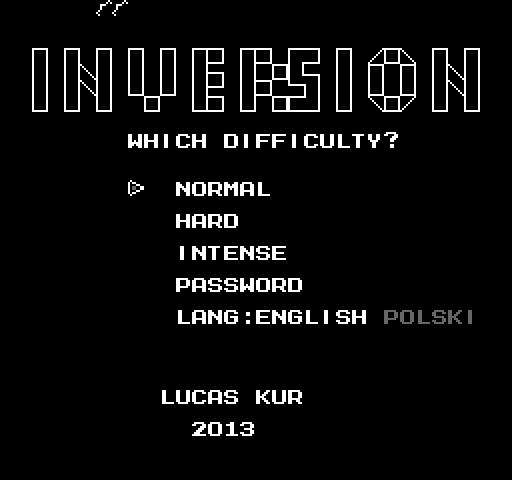
Satoshi, a boy with a rare colour blindness, sees only in black and white, and he can swap the two: solid blocks become empty space and the other way round.
Collect every key in a level to open the door. Satoshi can switch only when he is not standing inside a wall; in duo stages with a partner he can switch at any time, and some rooms switch on a timer instead.
There are seven worlds, from the Training Grounds to Black Colored Death, and three difficulties: Normal with unlimited lives, Hard with five and Intense with three and a timer. Text is in English or Polish, passwords save progress, and a password unlocks the harder Extra World.
Lucas "Dizzy9" Kur of Red Moon Games released it in September 2013; the current version is 1.4. MESHUGGAH's tool-assisted runs of the main game and the Extra World are on TASVideos.
Facts
- Made by Lucas "Dizzy9" Kur of Red Moon Games, released in September 2013.
- The current version is 1.4.
- A hidden Extra World is unlocked with a password.
Cartridge
- Mapper
- 0 · NROM
- PRG / CHR
- 32 KB / 8 KB
- Mirroring
- Horizontal
- Saves
- No
40,976 bytes · CRC32 B5D98039 · MD5 cb406db25ec8236a9293a04badc7907d
Keyboard controls
- D-pad
- ← ↑ ↓ →
- A
- Z
- B
- X
- Start
- Enter
- Select
- V
Steam Controller
- D-pad
- D-pad
- A
- A
- B
- B
- Start
- Start
- Select
- Select
Xbox controller
- D-pad
- D-pad
- A
- A
- B
- B
- Start
- Menu
- Select
- View
DualSense controller
- D-pad
- D-pad
- A
- ✕
- B
- ○
- Start
- Options
- Select
- Create
Keys and controller buttons can be remapped with the Controls button under the game. Save and Load keep a snapshot of the game in your browser. Steam Controller works as a gamepad through Steam Input. On phones, on-screen buttons appear.
More Platformer games: NES
View all Famidash: Huge ManNES · Platformer
 Famidash: B-SidesNES · Platformer
 CelesteNES · Platformer
 Cheril the GoddessNES · Platformer
 Wo Xiang Niao NiaoNES · Platformer
 Vigilante Ninja 2NES · Action
 SatsmashNES · Platformer
 Proto DereNES · Platformer
 ROB.NNES · Platformer
 Cheril the WriterNES · Platformer
 5-StarNES · Platformer
 BooteeNES · Platformer