
NES
Gruniozerca 2: The Great Cavy Rescue
Play online for free: no sign-up, no install, right in your browser.
Emulator
- Frame rate
- 0 FPS
- Speed
- 0 %
- Uptime
- 0:00
- Controller
- Keyboard
Emulated console
- CPU
- Ricoh 2A03 (6502), 1.79 MHz
- Memory
- 2 KB RAM
- Video
- PPU, 256×240, 54 colors
- Video memory
- 2 KB VRAM
- Sound
- 5 channels: 2 pulse, triangle, noise, DPCM
- Cartridge
- Mapper 2 · UxROM, 64 KB / RAM
- Emulator core
- FCEUmm (EmulatorJS)
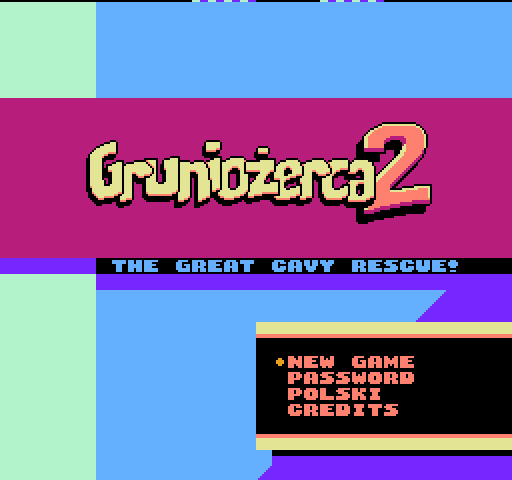
About Gruniozerca 2: The Great Cavy Rescue
- Platform
- NES
- Developer
- Łukasz "dizzy9" Kur and M-Tee
- Year
- 2018
- Genre
- Platformer, Puzzle
- Players
- 1
- License
- Homebrew
Dark Archon has got lost in his cellar looking for jam, and his guinea pig Grunio leads the rescue in this room-by-room puzzle platformer.
Grunio works through 24 rooms, collecting carrots, finding keys and reaching each exit. In Cavyvision you place toys to help him. The text can be switched to Polish, and passwords save progress.
Łukasz Kur and M-Tee made it between November 2017 and January 2018. They decided to release it through the 2017 NESdev Coding Competition and trimmed the ROM to 64 KB to meet the rules. It is part of Gruniożerca Trilogy for Switch.
How to play
- Controls
- Left and Right move, Down presses a switch, A jumps, B enters Cavyvision, Start pauses. In Cavyvision the D-pad moves the cursor, A places or uses a toy, Select changes toys and B exits.
Facts
- Made by Łukasz Kur and M-Tee between November 2017 and January 2018.
- Entered in the 2017 NESdev Coding Competition; trimmed to 64 KB for its rules.
- Part of Gruniożerca Trilogy for Nintendo Switch.
Cartridge
- Mapper
- 2 · UxROM
- PRG / CHR
- 64 KB / RAM
- Mirroring
- Vertical
- Saves
- No
65,552 bytes · CRC32 CCEB1CE3 · MD5 fd45e907d93575d2edf50b92aeba3bae
Keyboard controls
- D-pad
- ← ↑ ↓ →
- A
- Z
- B
- X
- Start
- Enter
- Select
- V
Steam Controller
- D-pad
- D-pad
- A
- A
- B
- B
- Start
- Start
- Select
- Select
Xbox controller
- D-pad
- D-pad
- A
- A
- B
- B
- Start
- Menu
- Select
- View
DualSense controller
- D-pad
- D-pad
- A
- ✕
- B
- ○
- Start
- Options
- Select
- Create
Keys and controller buttons can be remapped with the Controls button under the game. Save and Load keep a snapshot of the game in your browser. Steam Controller works as a gamepad through Steam Input. On phones, on-screen buttons appear.
More Platformer games: NES
View all Famidash: Huge ManNES · Platformer
 Famidash: B-SidesNES · Platformer
 CelesteNES · Platformer
 Cheril the GoddessNES · Platformer
 Wo Xiang Niao NiaoNES · Platformer
 Vigilante Ninja 2NES · Action
 SatsmashNES · Platformer
 Proto DereNES · Platformer
 ROB.NNES · Platformer
 Cheril the WriterNES · Platformer
 5-StarNES · Platformer
 BooteeNES · Platformer